Instructions
One of the easiest and most useful beginner projects is connecting a push button and a buzzer. .
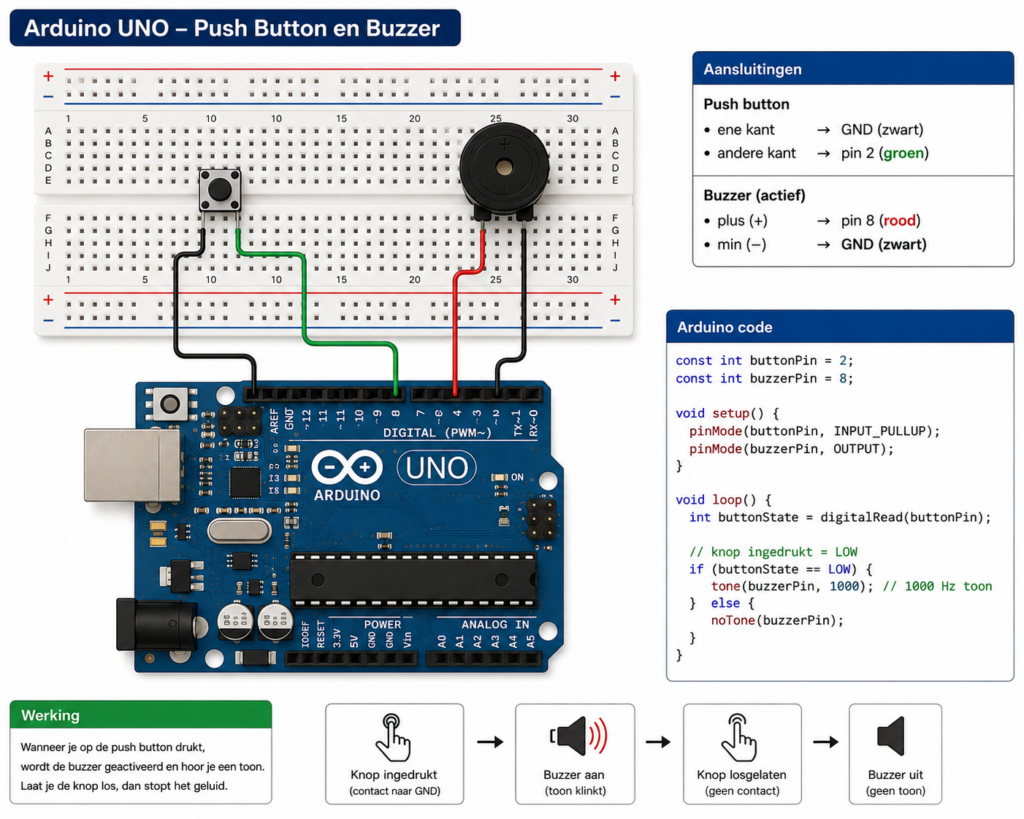
When the button is pressed, the buzzer will produce a sound. When the button is released, the sound stops.
| component | connection |
| Push button | One side to GND |
| Push button | Other side to pin 2 |
| Buzzer (+) | Pin 8 |
| Buzzer (-) | GND |
The exact position on the breadboard does not matter. For example, the push button can be placed between rows D5 and D7, while the buzzer can be connected around rows D20 and D23, as long as the electrical connections are correct.
const int buttonPin = 2;
const int buzzerPin = 8;

void setup() {
  pinMode(buttonPin, INPUT_PULLUP);
  pinMode(buzzerPin, OUTPUT);
}

void loop() {
  int buttonState = digitalRead(buttonPin);

  // Button pressed
  if (buttonState == LOW) {
    tone(buzzerPin, 1000);
  } else {
    noTone(buzzerPin);
  }
}
Leave a Reply